UI vs UX: What’s the Difference and Why It Matters for Your Website
UI and UX are two terms that are often used interchangeably, pero magkaiba talaga sila. If you're building a website, app, or online system, you need to understand both UI and UX para maging effective, modern, and high-converting ang final output.
Let’s break them down clearly.
1. What Is UI (User Interface)?
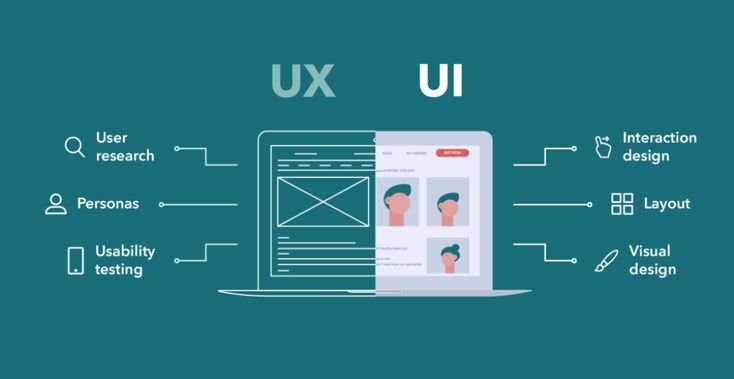
UI is the visual layer of your product — everything the user sees on the screen.
UI includes:
- visual design
- colors
- typography
- spacing
- button styles
- images and illustrations
- layout arrangement
In short: UI = how your website looks.
Examples of good UI:
- a clean, balanced hero section
- modern buttons with clear labels
- a professional, consistent color palette
- clean icons
- comfortable spacing between sections
- clear hierarchy in headings and text
UI is responsible for making your website look beautiful, modern, and professional.
2. What Is UX (User Experience)?
UX is the experience and flow of the product — how it feels to use.
UX covers:
- how easy it is to use your website
- navigation structure
- how fast users can complete tasks
- user flows from page to page
- how well the site solves user problems
- overall satisfaction of the user
In short: UX = how your website works and how it feels to use it.
Examples of good UX:
- customers can find the “Contact” page in just 1–2 clicks
- checkout process is simple and straightforward
- users do not feel confused or lost while navigating
- navigation labels are clear and logical
- forms are easy to fill out and understand
UX is responsible for making the experience efficient, intuitive, and satisfying.
3. The Simplest Way to Understand the Difference
Imagine your website is a car:
- UI = the paint, lights, dashboard, seats, and overall design
- UX = how the car drives, accelerates, handles, and feels on the road
UI makes it beautiful.
UX makes it usable.
Both are required for a great car — and for a great website.
4. Why UI and UX Must Work Together
A beautiful website with bad UX will make customers leave quickly. A website with good UX but poor UI may look unprofessional and lose trust.
UI and UX must support each other to create:
- clarity
- trust
- conversion
- user satisfaction
- long-term growth for your business
5. Common Signs of Bad UI
- cluttered or messy layout
- too many colors used everywhere
- little to no spacing between sections
- text that is too small or hard to read
- pixelated or low-quality images
- outdated or “template-looking” design
- inconsistent fonts and styles
Bad UI usually leads to low trust and a poor first impression.
6. Common Signs of Bad UX
- hard-to-find navigation items
- slow loading pages
- complicated or confusing menus
- too many steps to complete a simple action
- forms that ask for too much information
- no clear call-to-action buttons
- inconsistent layout or page flow
Bad UX usually results in low conversions and frustrated users.
7. Examples of Good UI and UX in Action
Good UI example:
A simple, clean homepage that has:
- a strong, clear headline
- readable, well-sized text
- consistent brand colors
- high-quality images or mockups
- comfortable spacing and alignment
Good UX example:
A user visiting your website can:
- see what you offer within seconds
- find your services in just 1–2 clicks
- view pricing or portfolio without hunting around
- contact you easily through clear buttons or forms
- read content without feeling overwhelmed
Good UI catches attention.
Good UX keeps users engaged and moving forward.
8. How to Improve Your UI (Quick Wins)
- Limit your palette to 2–3 main colors
- Use only 1–2 font families throughout the site
- Increase spacing between sections and elements
- Use clean, consistent icons
- Use WebP images for sharper visuals with smaller size
- Maintain a consistent visual style across all pages
- Avoid clutter and unnecessary visual noise
These changes immediately make your site look more premium and professional.
9. How to Improve Your UX (Quick Wins)
- Make your main call-to-action (CTA) very clear
- Simplify your navigation labels and menu structure
- Add a visible contact or “Get a Quote” button
- Ensure the site is fully mobile-friendly
- Improve loading times with basic performance optimization
- Organize content into logical sections with headings
- Use readable text sizes, especially on mobile
These updates can quickly improve conversion rate and user satisfaction.
10. Do UI and UX Affect SEO?
Yes — indirectly but significantly.
Google pays attention to signals like:
- bounce rate
- time on site
- pages per session
- mobile usability
If users leave quickly or struggle to use your website, Google sees that as a bad experience and may rank you lower over time.
A website with good UI and UX tends to have better engagement — which supports better SEO performance.
Conclusion
UI and UX are different, pero parehong critical for your website’s success.
UI = how it looks
UX = how it works and feels
When both are done well, your website becomes:
- visually appealing
- easy to use
- trustworthy
- high-converting
- memorable for visitors
This is what modern users expect in 2025 — and what your business needs to stand out online.
Need Professional UI/UX for Your Website?
PrimeCode WebWorks builds performance-first, SEO-ready, conversion-optimized websites designed with clean UI and solid UX foundations.
Message us anytime if you’d like to review, redesign, or rebuild your current website experience.